4.2. CAMPAIGN DETAILS
C. Campaign Description
Now it's time to enter the details of your campaign. Please follow these steps carefully because failure to include adequate information could delay campaign approval.
CAMPAIGN DESCRIPTION - Give a clear and detailed description of what the campaign will be used for. This must be at least 40 characters in length.
TCR must be able to tell the intended purpose of the overall messages. Be sure the description of your BRAND aligns with the registered USE CASE. (For example, if you registered a 2FA campaign but your description references customer care messages, that would result in a rejection.)
Your description should include the answer to the questions:
- Who are you? (state your brand name and the nature of your business)
- Who do you want to reach? (explain your use-case)
- Why are you sending out messages? (explain types of messages you will send)
- If donations are collected, it must be clearly stated.
If multiple use cases are registered, describe all use cases in the description. (For example, for a low volume mixed campaign that includes 2FA and Marketing use cases, both use cases should be mentioned in the campaign description.
- Use this template: (Company Name) will use this campaign to send [Use Case] messages to opted-in clients.
- Example: ABC LLC will use this campaign to send customer care messages to opted-in clients.
If you are not using the campaign in accordance with the description given, there is a good chance it may get flagged so be as clear and honest as possible here.
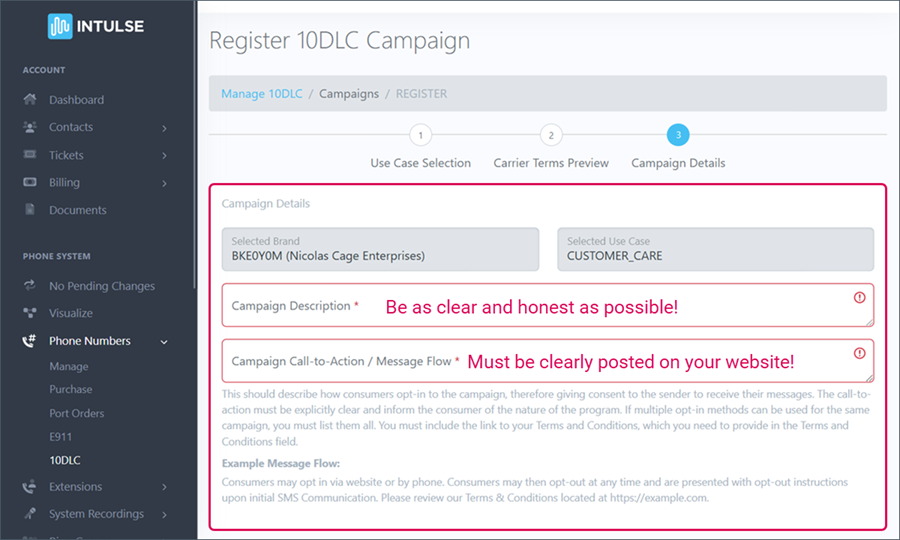
D. Campaign Call-to-Action
There are two portions of the Call-to-Action review:
- TCR will review the Call-to-Action/Message flow field in the campaign registration. This should contain a clear and concise description of how an end user signs up to receive messages. Opt-in must be 1 to 1, can't be shared with third parties, and can't be implied. It also can't be obscured within the Terms & Conditions and/or other agreement(s).
- TCR will review the actual Call-to-Action disclosure shared with the consumer/recipient during the opt-in collection. Your campaign MUST have a working website with complete CTA information if opt-in occurs outside of the website. Campaigns will be rejected for insufficient call-to-action sections. Provide a working website link and a clear and concise description of how an end user signs up to receive messages.
If the Call-to-Action mentions the opt-in being collected on a website, the website MUST be provided in order for the campaign to be approved!
CAMPAIGN CALL-TO-ACTION / MESSAGE FLOW - Describe how a consumer will opt-in to the campaign, giving consent to receive messages. The call-to-action must be explicitly clear and inform the consumer of the nature of the program. If multiple opt-in methods can be used for the same campaign, you must list them all. This must also include a link to the Terms and Conditions.
PART 1. EXAMPLES OF HOW USERS OPT-IN:
- Web Form: Consumers opt-in by visiting a website and adding their phone number. They then check a box agreeing to receive text messages from the brand. Provide a direct link to the form in the CTA. The web form should include opt-in language, links to your company’s Terms & Conditions and Privacy Policy pages, expected message frequency, pricing, HELP and OPT OUT information. A check box is required to collect consent for Web opt-in due to regulations prohibiting forced opt-in by carriers.
- Use this template: New and existing customers of (COMPANY NAME) have the option to opt into receiving text messages by filling out a form on our website (WEB CONTACT FORM LINK). They can check a box to opt in to receive (USE CASE) text messages. They are informed that (insert SMS website opt-in disclosure) Our Privacy Policy can be found at (LINK) and Terms & Conditions at (LINK).
- Good Example: New and existing customers of ABC LLC have the option to opt into receiving text messages by filling out a form on our website WWW.ABCLLC.COM/CONTACTUS. They can check a box to opt in to receive CUSTOMER CARE AND ACCOUNT NOTIFICATIONS text messages. They are informed that, By submitting this form and signing up for texts, you consent to receive customer care and account notifications regarding appointment reminders and service-related notification text messages from {ABC LLC} at the number provided. Consent is not a condition of purchase. Message & data rates may apply. Messasge frequency varies. Unsubscribe at any time by replying STOP. Our Privacy Policy can be found at WWW.ABC.LLC/PRIVACYPOLICY and Terms & Conditions at WWW.ABC.LLC/TERMS.
- Bad Example: “Customers opt in by subscribing to our weekly newsletter, where they indicate that they would like to receive texts about upcoming shows” — missing brand name, opt-in consent mechanism, links to Terms & Conditions and Privacy Policy, message frequency and pricing disclosure, HELP and OPT-OUT information.
- Paper Form: Consumers provide phone numbers and express consent on a paper form. Put a copy of the paper form on a web page and include a link to that page in the CTA. The form should contain opt-in language, links to the Terms & Conditions and Privacy Policy pages, expected message frequency, pricing, HELP and OPT OUT information.
- Good Example: ABC LLC: Upon hire, employees sign an employment contract wherein they provide consent to receive scheduling messages as a part of their contract. (link to image of paper form) Message frequency varies. Message and data rates may apply. Reply STOP to unsubscribe and HELP for assistance. Terms & Conditions: {LINK} Privacy Policy: {LINK}.
- Bad Example: “ABC LLC: Upon hire, employees sign an employment contract wherein they provide consent to receive scheduling messages as a part of their contract” — missing links to a copy of paper form, Terms & Conditions and Privacy Policy, message frequency, pricing disclosure, HELP and OPT OUT information
- Verbal: Customers opt-in over the phone, providing a verbal consent to receive texts. The phone number, time stamp and voice record of consent needs to be stored on a recorded line. A good practice is the implementation of double opt-in, as an additional layer of consent that will be easier saved and stored. Provide a link or attachment of the script.
- Use this template: (COMPANY NAME) will be collecting opt-ins verbally from their customers. Customers will be able to opt in to receive messages either in person at their physical location, or over a phone call if the customer calls. When a customer is registered for the first time, they are asked to provide their phone number, and staff are trained to ask if the customer would like to opt in to SMS (USE CASE) messages. They will be verbally informed that "Message and data rates may apply", "Message frequency may vary", and they can "text HELP for support or more information and STOP to unsubscribe at any time." They will also be informed that their phone number will not be shared with third parties for marketing or promotional purposes. Privacy Policy can be found at (LINK) and Terms & Conditions at (LINK)
- Good Example: ABC LLC will be collecting opt-ins verbally from their customers. Customers will be able to opt in to receive messages either in person at their physical location, or over a phone call if the customer calls. When a customer is registered for the first time, they are asked to provide their phone number, and staff are trained to ask if the customer would like to opt in to SMS CUSTOMER CARE messages. They will be verbally informed that "Message and data rates may apply", "Message frequency may vary", and they can "text HELP for support or more information and STOP to unsubscribe at any time." They will also be informed that their phone number will not be shared with third parties for marketing or promotional purposes. Privacy Policy can be found at WWW.ABC.LLC/PRIVACYPOLICY and Terms & Conditions at WWW.ABC.LLC/TERMS.
- Bad Example: “Consumers opt in by booking an appointment” — missing brand name, channel and details of opt-in flow, links to Terms & Conditions and Privacy Policy, message frequency, pricing disclosure, HELP and OPT-OUT information
- Consumer Initiated Messaging: Consumers either text a keyword or message to an organization. Explain how the consumer/recipient is informed to text the keyword or initiate the text message conversation. Acceptable explanations of how the consumer is informed include a link to a webpage where the keyword opt-in is advertised or an attached screenshot of the keyword opt-in advertisement.
- Keyword Example: By texting START to {PHONE NUMBER}, you consent to receive marketing text messages from {COMPANY NAME}. Consent is not a condition of purchase. Msg & data rates may apply. Msg frequency varies. Unsubscribe at any time by replying STOP or clicking the unsubscribe link (where available). Reply HELP for help. Terms & Conditions: {LINK} Privacy Policy: {LINK}.
- Consumer-Initiated Messaging Example: By starting a text conversation with {COMPANY NAME} by texting {PHONE NUMBER}, you are agreeing to receive conversational messages from {COMPANY NAME}. Msg & data rates may apply. Msg frequency varies. Unsubscribe at any time by replying STOP or clicking the unsubscribe link (where available). Reply HELP for help. Terms & Conditions: {LINK} Privacy Policy: {LINK}.
- Mixed: A combination of two or more opt-in methods - web forms, verbal, or paper forms
- Good Example: ABC School: Subscribers opt in by visiting our website and registering for a dance class by clicking on “Book” and submitting the enrollment form at https://abcschool.com/enroll.jspx with their name, address, and contact details. Alternatively they can opt in at our studio, where they sign a paper copy of our online enrollment form. Message frequency varies. Message and data rates may apply. Reply STOP to unsubscribe and HELP for assistance. Terms & Conditions: {LINK} Privacy Policy: {LINK}.
- Bad Example: “Subscribers enroll for a dance class and provide consent to receive text notification” — missing brand name, opt-in mechanism, links to Terms & Conditions and Privacy Policy, message frequency, pricing disclosure, HELP and OPT-OUT information
This information must be clearly posted on your corporation's website, as covered in Step 3.
CAMPAIGN CALL-TO-ACTION / MESSAGE FLOW
PART 2. CALL-TO-ACTION DISCLOSURE SHARED WITH CONSUMER:
Your Call-to-Action MUST include the following:
- Brand Information: the name of the brand sending the text
- Types of Messages Being Sent: describe your use case
- Message Frequency: how often will you send texts; eg: “You may receive up to two messages a week” or “Message frequency varies” or “Message will be sent when a user registers or changes password”
- Pricing Disclosure: “Message and data rates may apply”
- Instructions on how to request HELP
- Instructions on how to STOP or unsubscribe
- Link to your Terms & Conditions page
- Make sure your Terms & Conditions meet the mobile carriers' requirements. Specific details, along with a template, can be found HERE.
- Link to your Privacy Policy
- Privacy Policy must have a no-sharing clause that states subscriber information will not be shared with 3rd parties for their direct marketing purposes. For example, “No mobile information will be shared with third parties/affiliates for marketing/promotional purposes. All the above categories exclude text messaging originator opt-in data and consent; this information will not be shared with any third parties.”
E. Sample Messages
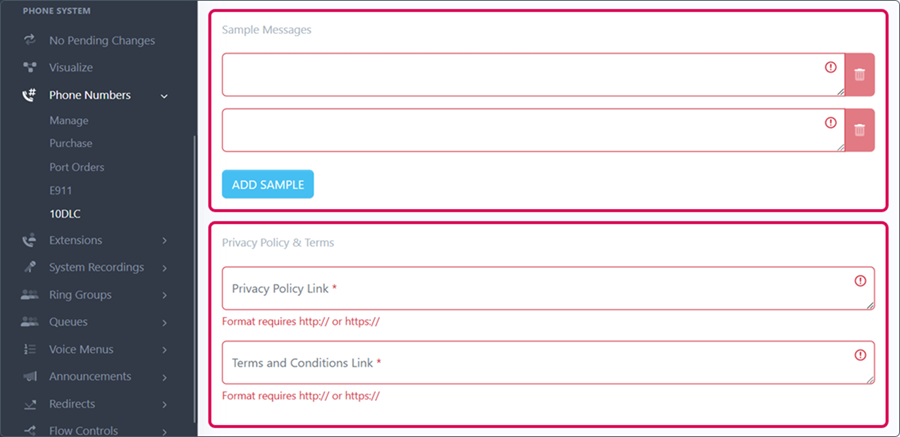
SAMPLE MESSAGES - This field is used to capture a sample of the types of messages that will be sent on this campaign. Messages should be unique and provide examples of content you may send so TCR can tell what the interaction may look like.
Sample Messages should:
- Correspond to the use case - For example, if you select charity as the use case but are sending appointment reminders, your campaign will be rejected. You would either need to update the sample messages or change the use case to better align with the content being sent.
- Identify the Brand in the message
- Provide at least one sample message that includes Opt-Out language - include brand name, confirmation of opt-out, and confirmation they will receive no further messages
- For a mixed campaign, provide examples of each campaign type: 2FA, customer care, marketing, etc.
If the campaign uses an Embedded Link, a link must be included in at least one of the sample messages
- If your messages contain URLs or codes, use parameters within brackets to indicate them — for example, “Your (brand name) verification code is {Code} for {URL}.”
Good Example: Hi {FirstName}, this is ABC Dental. Your scheduled visit with us is coming up on 10/01 at 9:00 a.m. Text C to confirm. Text STOP to stop receiving messages. Reply HELP for assistance or STOP to opt out.
Bad Example: “Your scheduled visit with us is in 3 days” — lacks brand name and opt-out information
Good Example: Hey {FirstName}, check out the new fall collection at ABC Boutique https://abc-llc.com/boutique. Get 35% off all items. Reply STOP to unsubscribe. Reply HELP for assistance or STOP to opt out.
Bad Example: “ABC Boutique sale - get 35% off all items” — lacks opt-out language and URL
Good Example: Your ABCMed verification code is 123456. Reply HELP for assistance or STOP to opt out.
Bad Example: “Access code: 247304” — lacks brand name
F. Privacy Policy & Terms
Privacy Policy & Terms
- Privacy Policy Link - add a direct link to your SMS Messaging Privacy Policy here
- Terms & Conditions Link - add a direct link to your SMS Messaging Terms & Conditions here
If you need more information about these documents, see Step 3.
G. Campaign & Content Attributes
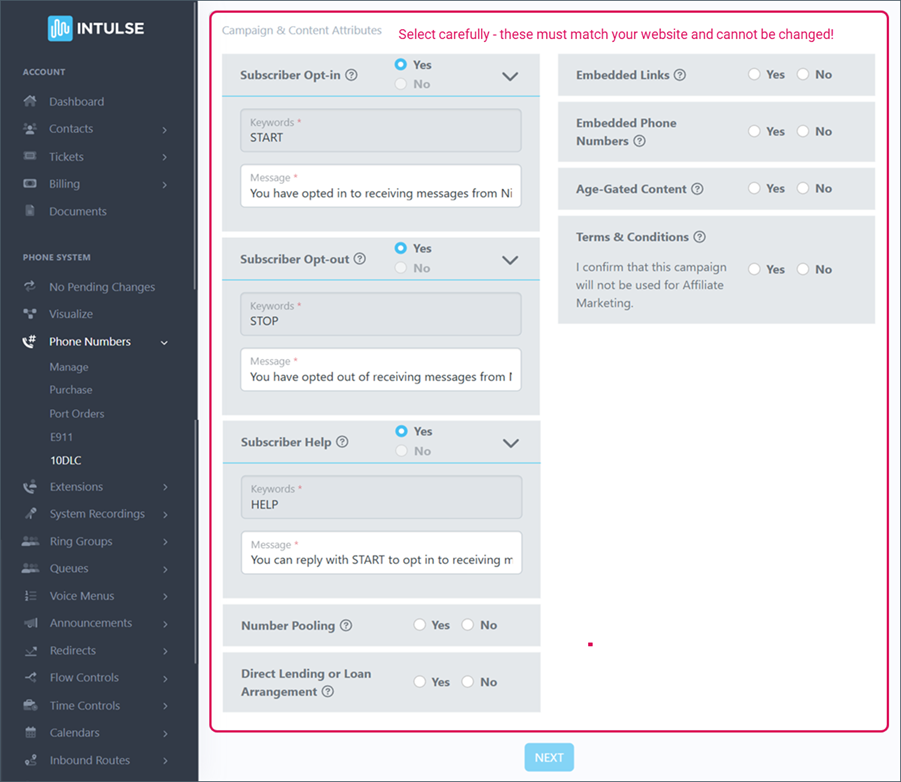
Please make sure your content attributes are correct while setting up your campaign. These fields can not be changed, so a brand-new campaign will have to be submitted.
- Example: If a customer selects No for the embedded link, but the sample content provided clearly shows links, they will need to resubmit their campaign with Yes selected for the embedded link.
Subscriber Opt-in, Opt-out, and Help messages are auto-populated for you. Please read these carefully to verify your information. In some cases you may need to update the HELP message with a specific support email address or phone number.
CAMPAIGN & CONTENT ATTRIBUTES - During the Campaign registration process, you will be asked to answer Yes or No to indicate whether the Campaign has the listed attributes. Some attributes may require you to add specific information.
- Subscriber Opt-in - indicates whether the campaign is collecting and processing consumer opt-ins; provide opt-in keywords if applicable
- This is REQUIRED The message MUST include brand name, instructions on how to request help, message frequency, "message and data rates may apply" disclosure, and instructions on how to opt-out.
- Example: Thank you for opting in to receive recurring messages from (Company Name). Msg frequency varies. Msg & data rates may apply. Reply HELP for help. Reply STOP to cancel.
- Subscriber Opt-out - indicates whether the campaign is collecting and processing consumer opt-outs; provide opt-out keywords
- This is REQUIRED The message MUST include brand name, acknowledgement of opt-out, and confirmation they will receive no further messages.
- Example: You have successfully opted out of messages from (Company Name). You will receive no further messages.
- Subscriber Help - indicates whether the campaign has implemented replies providing recipients with additional information on how to contact the message sender by replying with the “HELP” keyword; provide the HELP keywords
- This is REQUIRED The message MUST include brand name, a toll-free number, email, or website where they can reach out for help, and opt-out information.
- Example: Thank you for reaching out to (Company Name). Please call us at (phone number) or email us at (email address) for support. Reply STOP to opt out.
- Number Pooling - indicates whether more than 50 numbers will be used with the campaign
- Direct Lending or Loan Arrangement - indicates whether the campaign includes content related to direct lending or other loan arrangements
- Embedded Links - indicates whether the campaign will send embedded links of any kind (Note: public URL shorteners such as bitly or tinyurl are not accepted) If you have embedded links, you MUST provide examples here and an embedded link MUST be included in at least one of the sample messages.
- Embedded Phone Numbers - indicates whether the campaign will send embedded phone numbers (except the required HELP information contact phone number) If checked yes, an embedded phone number must be included in at least one of the sample messages.
- Age-Gated Content - indicates whether the campaign includes any age-gated content as defined by Carrier and CTIA guidelines (SHAFT content)
- Terms & Conditions - MUST be checked Yes, and the Terms & Conditions link MUST be provided in the Terms & Conditions Link field.
Direct Lending Campaigns must have the appropriate Content Attribute selected. Be sure to select "direct lending or loan agreement" under campaign and content attributes. Currently, these fields are not editable in existing campaigns. Please note that any campaign for a lender will need this attribute checked. For example, the campaign type is Marketing but the sample messages ask questions about qualifying someone for a loan and the campaign/content attributes do not indicate lending (i.e., sample message that asks "Can you please provide your first and last name, and either the year, make and model of your vehicle or the last 4 digits of your SSN?").
Click the blue NEXT button to submit your campaign.
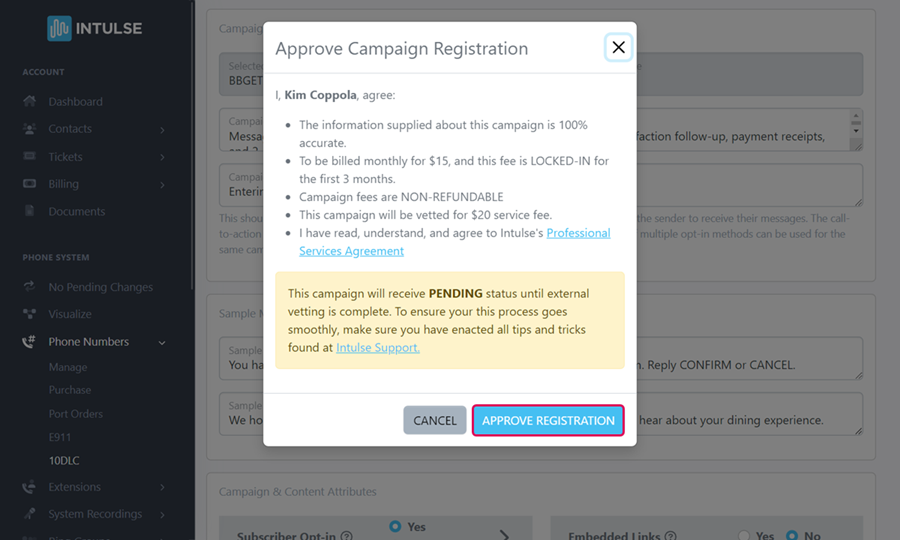
Carefully review the billing details and the Professional Services Agreement and click the blue APPROVE REGISTRATION button.
You will be charged a NON-REFUNDABLE $20 Campaign Vetting Fee. You will also see your monthly Campaign fee in this dialogue box. Clicking Approve locks you into this monthly fee for 3 months. Even if your campaign fails, you will be locked into both of these fees with TCR. This is not an Intulse fee so we have no control over this billing.
