
The Yealink EXP55 Color Expansion Module is a premium sidecar designed to scale up the call-handling capabilities of the Yealink T7X and T8X phones. Intended for receptionists, administrative assistants, and contact center power-users managing heavy call volumes, it features a vibrant 5.5-inch color display. With 3 pages of 26 programmable line keys for a total of 78 keys, this sidecar allows users to configure essential shortcuts like speed dials, call transfers, parking spots, and busy lamp field (BLF) lines. Up to 3 expansion modules can be added to most Yealink phones, providing up to 234 additional programmable keys. With its ergonomic dual-angle stand, integrated USB port, and the flexibility to daisy-chain up to three units together, the EXP55 transforms a standard desk phone into a robust, centralized attendant console.
Begin by unplugging your desk phone.
Follow these same steps to connect additional sidecars.
As your EXP55 powers on, you will see a welcome screen that indicates that the device is loading. Once that message clears, you can begin to assign the desired settings.
You can customize the sidecar's wallpaper via the host phone.
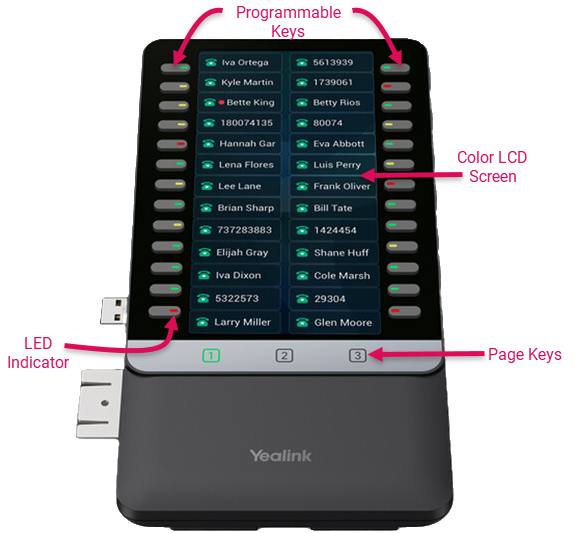
To program a key on your EXP55, press and hold the desired key and the phone will enter the setting screen of this key.
Store frequently called numbers that can be easily dialed by pressing a single line key.
Store extensions and shared voicemail boxes that can be easily dialed.
The LED indicator will glow green when an extension is available, or red when unavailable.
For shared voicemail boxes, it will glow red when there are new messages.
Any other more advanced features, such as call park, etc can be selected by your system administrator within the Account Center.
Use the Page Keys at the bottom of the sidecar to scroll to additional pages of programmable line keys. Each page will display 20 keys, for a total of 60 keys on each sidecar.